There will be times when you want to be kept in the loop on a ticket that you aren't actively working on. Following a ticket in Halo BCCs you (or who ever you added to the follower list) on all public messages on that ticket.
This article covers how to follow a ticket, assign a follower to a ticket, and edit a ticket's followers.
Before You Start
You will need the following before you can complete this task:
- An active Wharton faculty or staff affiliation
- You also need to be logged into the Agent Application to see tickets in Halo.
Follow a ticket
Adding yourself as a follower to a ticket is very easy:
- Open the ticket that you'd like to follow.
- Click the Follow icon at the top right of the ticket.

- Click Follow this Ticket.
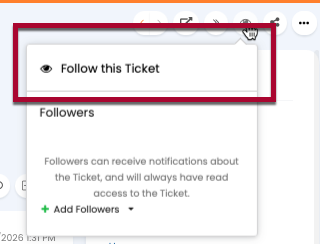
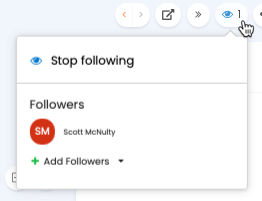
- You're added to the follower list of the ticket and you'll be BCCed on any public messages sent via this ticket. Be aware that if you respond to one of those messages it will be a public as well.
Making Someone else a Follower
- Open the ticket that you'd like to have someone follow.
- Click on the Follow icon on the top right of the ticket.

- Click Add Followers.
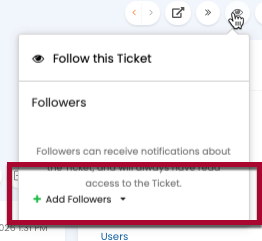
- Click Search Agents.
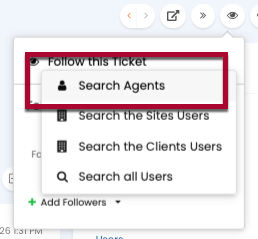
- Type in a name of an agent you’d like to follow this ticket (choose someone other than yourself).
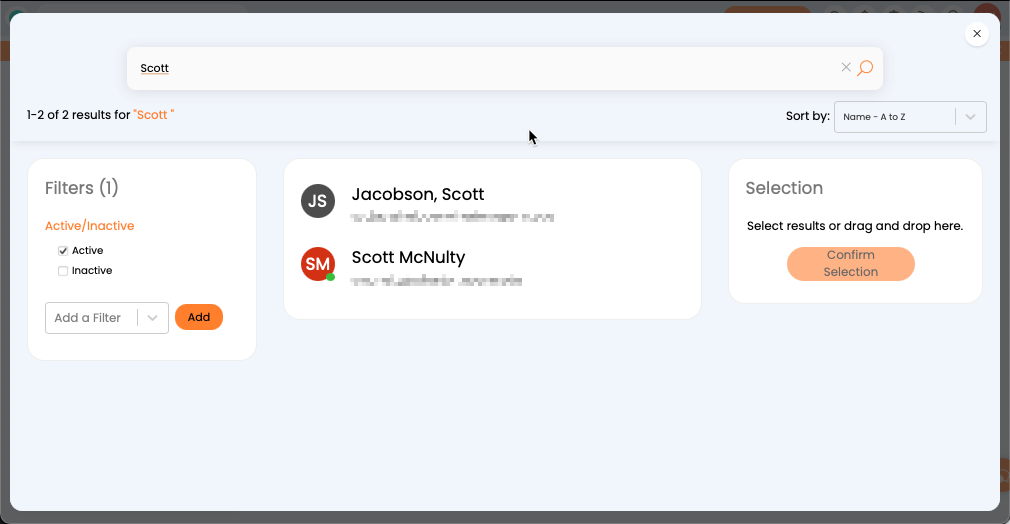
- Click the name of the person you want to add as a follower. You can also, at this point, add more people to your selection by searching for them and clicking on their names. Once you have all the people selected click Confirm Selection.
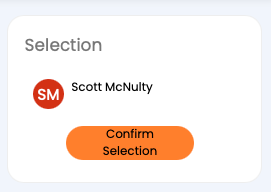
- Hover over the eye icon to see that the new follower is listed in the Followers section. The followers will be BCCed on any public messages sent via this ticket. Be aware that any responses to one of those messages will be public as well.
Note: These directions assume you want to make another Halo agent a follower. Use "Search all users" option instead of "Search Agents" if you're trying to add a follower who isn't an agent.
Edit a Ticket's Followers
- Open the ticket that you'd like to have someone follow.
- Hover over the Follow icon on the top right of the ticket.
- Click the x icon next to the follow you're like to remove. Or if you want to stop following a ticket, click Stop following.
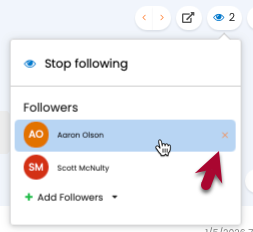
- The follower is removed.
