
Anthropic Claude Enterprise adds enterprise-level security, enhanced privacy, and data agreements to Claude, Anthropic’s generative AI assistant, ensuring that it can be leveraged responsibly with University data. No data entered in Penn’s Anthropic Enterprise workspace is used for training Anthropic’s models.
Claude Enterprise is offered alongside Wharton's existing ChatGPT Edu workspace — it does not replace it.
Claude Enterprise also features:
- Access to Anthropic's Claude models, including Haiku, Sonnet, and Opus
- Claude Code, Anthropic's agentic coding tool
Claude Code, Anthropic's agentic coding tool, is included with Claude Enterprise. Additional Anthropic tools (Claude for Science, Design, etc.) are not currently available as part of Penn's Claude Enterprise license.
Claude Cowork is not currently available in Claude Enterprise.
Claude Enterprise Benefits
The feature set for Penn’s Anthropic Enterprise offering is still being finalized. Our goal is to align the offering with what people have come to expect from personal Claude accounts. One known difference at launch: Claude Cowork will be disabled out of the gate, though work is ongoing to determine how that feature can be enabled more broadly.
Enhanced Privacy
Data entered into Penn’s Anthropic Enterprise workspace is never used by Anthropic to train its AI models. This means some University confidential data can be used with Claude Enterprise. Please see the “Security and Data” section below for more information.
Models
Claude Enterprise accounts have access to Anthropic's Claude models. You can switch between models with a single click, choosing the model best suited to the task at hand:
- Haiku is the fastest and least expensive model, best for quick, simple requests.
- Sonnet is the strongest all-around choice for most day-to-day work, and is the default model.
- Opus is the most capable model, but also the most expensive per message — something to keep in mind if you are watching a usage allocation.
License Levels
Penn offers two Claude Enterprise service levels: Standard and Premium. Pricing, message allowances, and API allocations are managed by ISC under the University's contract with Anthropic — see Penn ISC's Anthropic Enterprise FAQ for current details and limits.
If you're using Claude with a personal account (Free, Pro, or Max) tied to your work email, you may be able to move that account into Wharton’s Enterprise workspace.
Get Claude
Most Wharton students have been provided with licenses; faculty and staff need to request an account.
Once you've obtained a license, there are two ways to get going with Claude -- using the web login, and downloading the app. Either way, the first time you access Claude you'll be prompted to complete a short training module that explains the rules, security and privacy concerns, and risks with using agentic coding tools. Once you complete the training you'll have access to Claude within 10-15 minutes.

Troubleshooting Training Course Issues
If the training course won't complete:
- Open a browser other than Safari (Chrome, Edge, or Firefox). Do not use Safari or a private/incognito window.
- Disable any video-related add-ons/extensions in your browser.
- Locate the extensions menu, usually in the top right of the browser window.
- Find any video-related extensions and disable them. If you're not sure how to disable them, choose a different browser.
- Ensure the browser has the latest updates. Directions for checking updates on:
- Make sure your browser’s privacy/security setting is Standard, rather than Enhanced or Strict.
- Open the training directly using this link: Launch Claude Training in Workday • If prompted, choose Yes or Resume to continue where you left off.
- Complete any remaining portions of the training.
- Take a screenshot of the final page. If you still cannot finish, take a screenshot of the last page you can reach.
If these troubleshooting steps do not mark the course complete, please send the screenshot you took in Step 7 as an attachment (or inline) to Penn's Workday Support Team. Your screenshot will provide proof of your effort in the course and the problem with completion. The training provider will determine if you can be manually marked complete based on this information.
Downloading the App and Logging In
These steps walk through downloading the Claude desktop app and signing in with YourPennKey@upenn.edu.
1. Download the app
Faculty and Staff Download and Installation Instructions
If you're installing Claude on a Wharton managed computer you need to install it via the Self Service ap
Windows Instructions
To install on a Wharton-managed Windows computer:
- Locate the BigFix icon in your system tray. (The system tray is at the bottom right corner, next to the time. You may need to click on the up/down arrow to expand it.)
- Double-click the BigFix Icon to open the app.
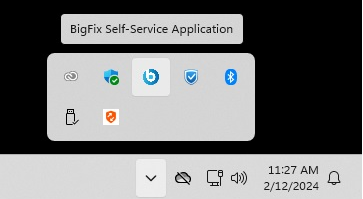
- Once the BigFix Self-Service app opens, click on the Claude Desktop entry.
- Click the Get button, and BigFix will download and install Claude in the background.
Mac Instructions
To install on a Wharton-managed Mac:
- Open your Applications folder in the Finder app and open the Self Service app.
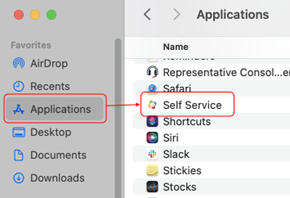
- Click the Install button under the Anthropic Claude Desktop entry.

- Once the Install button on the icon in the Self Service app changes to Reinstall, the installation is complete.

Student Download and Installation Instructions
Go to the Claude download page and click Install and open the app. If the download doesn't start automatically, use the download manually link.
- Step 1 – Open: Open the Claude installer file from your Downloads.
- Step 2 – Install:
- Mac: Drag and drop the Claude app into your Applications folder.
- Windows: Proceed through the installer wizard. You may be prompted for your Windows admin credentials.
- Step 3 – Launch: Open Claude from your Applications folder or Launchpad.

2. Mac only: Confirm the security prompt
Your Mac will ask if you're sure you want to open an app downloaded from the internet. Click Open to continue.

If it's your first time logging in, complete the training, and then wait up to 5 minutes for the system to confirm your training.
3. Click Get started and Sign in with your PennKey email
On the Sign In screen, enter your PennKey email address (pennkey@upenn.edu) in the email field and click Continue with SSO (you'll see this change from Continue with email).

4. Mac only: Allow Claude to use your sign-in
Your browser may show a prompt asking whether "Claude" wants to use "workos.com" to sign in. Click Continue to proceed with authentication.

5. Review "Before your first chat"
You'll see a short screen covering two things before your first chat:
- Ad-free chats – Claude won't show ads or let advertisers influence responses.
- Built to help, not harm – Automated safeguards protect your chats from violent, abusive, or deceptive content.
Click Continue.

6. Enter your preferred name
On the "What's your name?" screen, type the name you'd like Claude to call you, then click Continue.

7. Select your interests
Choose the option(s) that best describe what you're interested in (e.g., Coding & developing, Learning & studying, Writing & content creation, Business & strategy, Design & creativity, Career chat). This helps Claude tailor its suggestions. Click Continue.

Claude may ask what you'd like to try first. If you get this screen, choose a proposed topic or select I have my own topic.

8. Optional: Set up additional ways to use Claude
If you want to install Claude Code for your IDE or terminal, follow the guides provided by Anthropic here.
Logging in via Web
- Point your web browser to https://claude.ai/
- Enter your PennKey credentials: pennkey@upenn.edu in the email field.
(Don't enter your pennkey@wharton.upenn.edu address!) - Choose the SSO option and log in.
If it's your first time logging in, complete the training, and then wait up to 5 minutes for the system to confirm your training.
Verifying You Are Logged Into Penn's Claude Enterprise Workspace
Make sure you see your name and University of Pennsylvania next the to the Penn Shield logo to verify you are logged in with the correct account. Here's an example for Joseph Wharton:

Security and Data
The University’s contract with Anthropic ensures that no data uploaded to Penn’s Claude Enterprise workspace is used to train any of their AI models.
Additionally, the contract includes data protections that enable Claude Enterprise to be used with some kinds of data the University defines as confidential. The following table lists Wharton data classifications and data types and if they can be used within Claude Enterprise:
| Data Type | Allowed in Claude Enterprise |
|---|---|
| Low | Yes. |
| Moderate - Not Involving PII or FERPA data | Yes - We recommend connecting with the Wharton Information Security Office on these usages of Claude Enterprise. |
| Moderate - Involving PII or FERPA data | Yes, though you must engage with Wharton Information Security Office (ISO) for a risk review of the overall initiative’s data architecture and flow outside of the AI solution. |
| High* | Not yet. Data with this classification should not currently be uploaded to Claude Enterprise. Contact the Wharton Information Security Office if you require using data that falls into this category. |
| HIPAA/Protected Health Information | No. HIPAA data should not be uploaded to Claude Enterprise. Contact the Wharton Information Security Office if you require using HIPAA data. |
Claude Code
Security Considerations
Description: Claude Code is a local code-focused agent access through Claude Code in the CLI, IDE extension, or app. Features can support code editing, debugging, Git workflows, and terminal-based task execution in a user's local development environment.
Approved Data Tier: Up to Moderate (Non-PII / Non-FERPA)
Data Usage Notes: Code only. No secrets, passwords, API keys, PII, FERPA data, High data, sensitive institutional data, or non-code Moderate (Non-PII / Non-FERPA) data.
Claude Code is powerful: it can inspect and edit code, run terminal commands, and interact with repositories in a user's local development environment. Moderate (PII and/or FERPA) data or anything above Moderate (Non-PII / Non-FERPA) requires ISO engagement and risk review. Interconnections with other systems, DUAs/contracts, compliance obligations, or data pulled from Moderate (Non-PII / Non-FERPA) systems also require ISO engagement, including review of how data is protected in transit.
Users must monitor agent actions and report information security or privacy concerns, unauthorized access, or suspicious behavior to security@wharton.upenn.edu.
Claude Code Installation
Mac and Linux
If you want to run Claude Code natively on Mac or Linux follow Anthropic's instructions to install it via the terminal:
Windows
For those looking to run Claude Code natively on Windows we recommend you follow Anthropic's instructions:
See: Generative AI -- Best Practices and Resources for additional resources about using Generative AI tools at Penn.
Codex, Claude Code, GitHub Copilot, and similar tools can access files and take actions within the permissions you provide. Review AI Coding Assistants at Wharton: Safe Use Guidance before using one.
Questions?
Please contact your Wharton Computing representative with any questions regarding Claude Enterprise at Wharton.
Please contact Wharton’s Information Security Office with any questions you may have about data policies.